Free
Rules, the fee, the advance and a 30 day dashboard. On WordPress.org.
$0always
- Minimum and maximum order for COD
- COD fee, fixed, percent or both
- Partial COD through any gateway
- Up to 3 rules
- Block and classic checkout
Launch price: $29 one time for the first 199 buyers, then $49 for the next 200, then $39 a year per site.Get Pro
Skip to contentFor WooCommerce stores that ship cash on delivery
The courier charges for the trip out and the trip back, and the sale never happens. Threshold decides when cash on delivery is offered, adds a fee, and asks for a small advance through the payment gateway you already use.
Block and classic checkoutHPOS compatibleEarly Pro licences are one payment
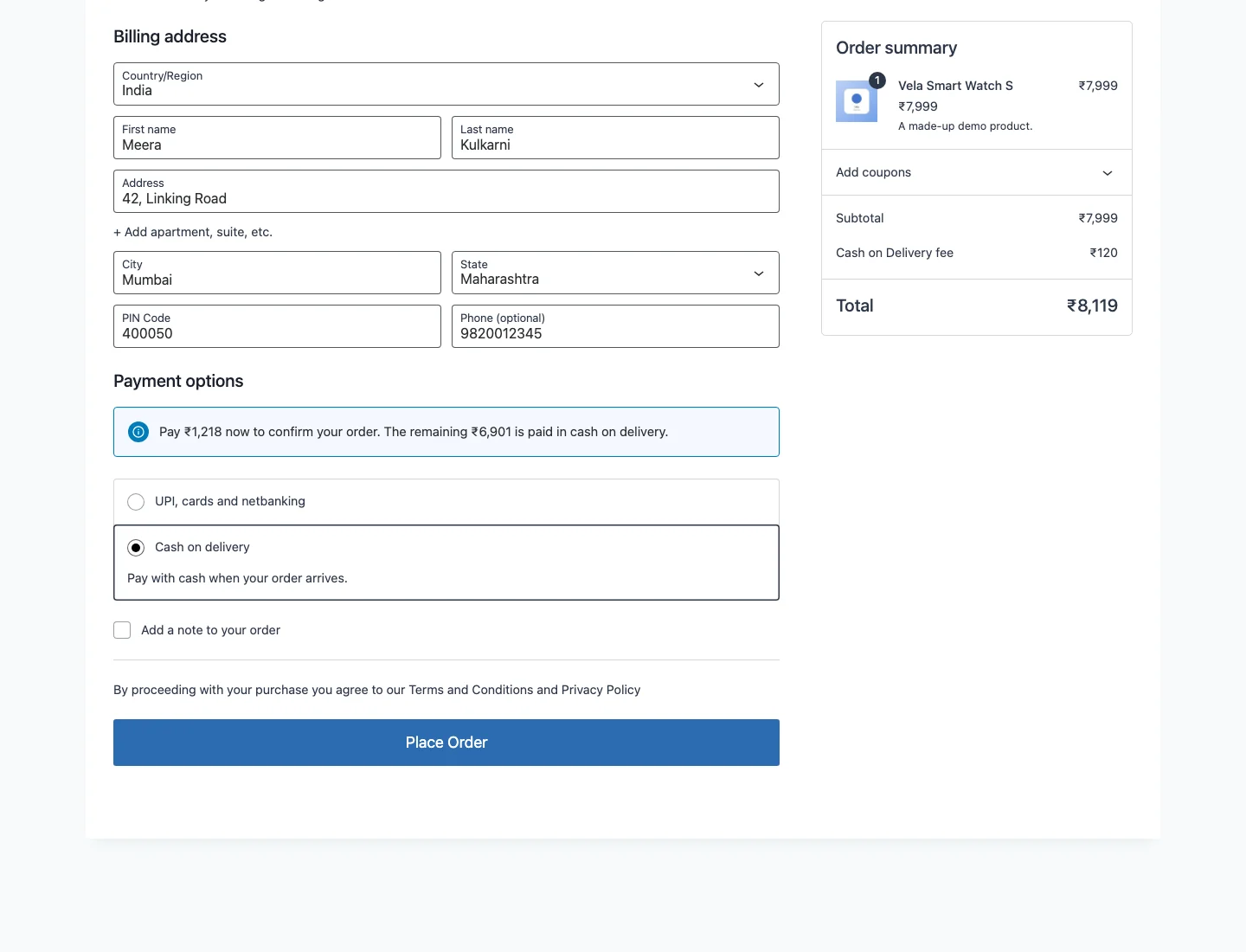 Pay a part now, the rest on delivery
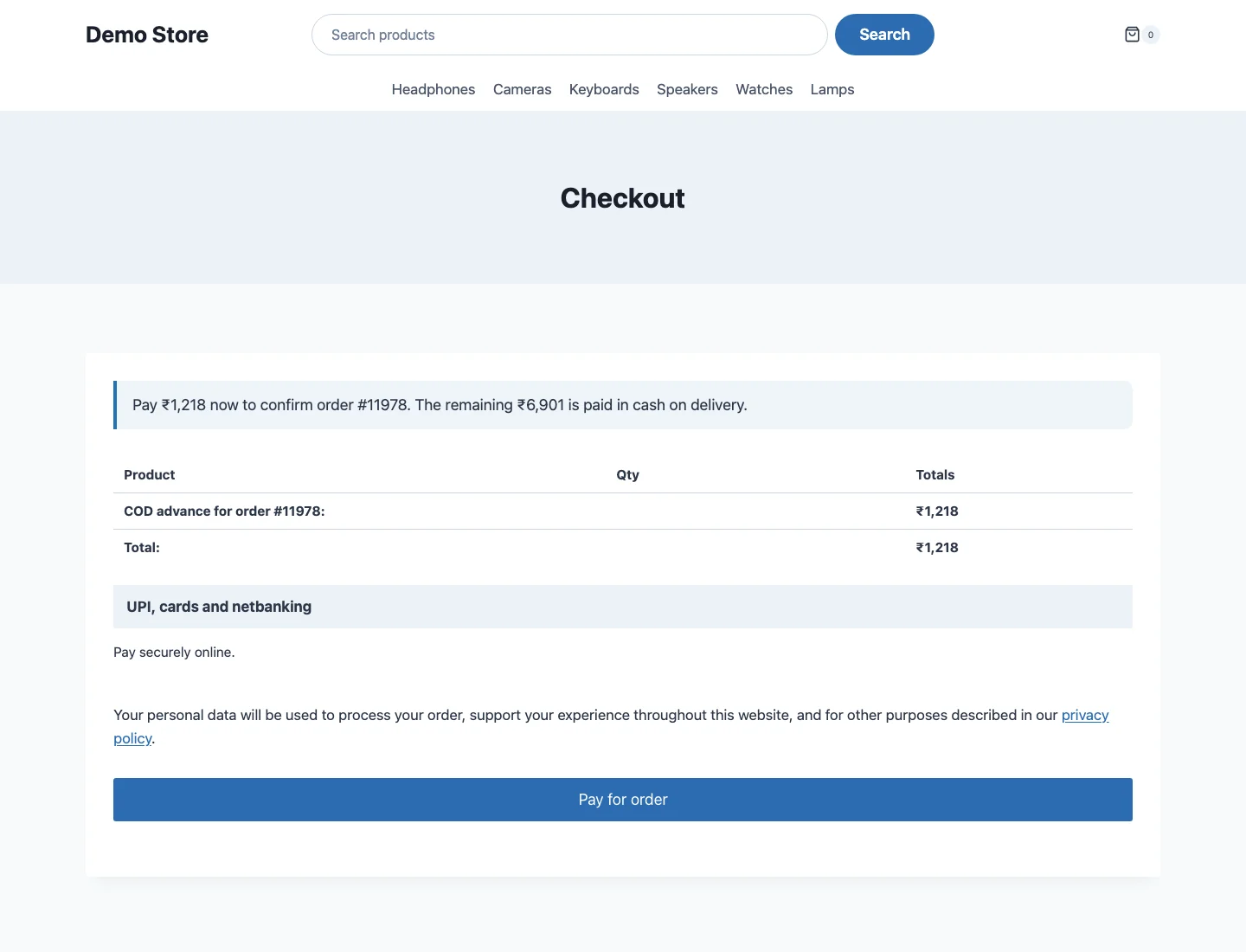 Any gateway the store already uses
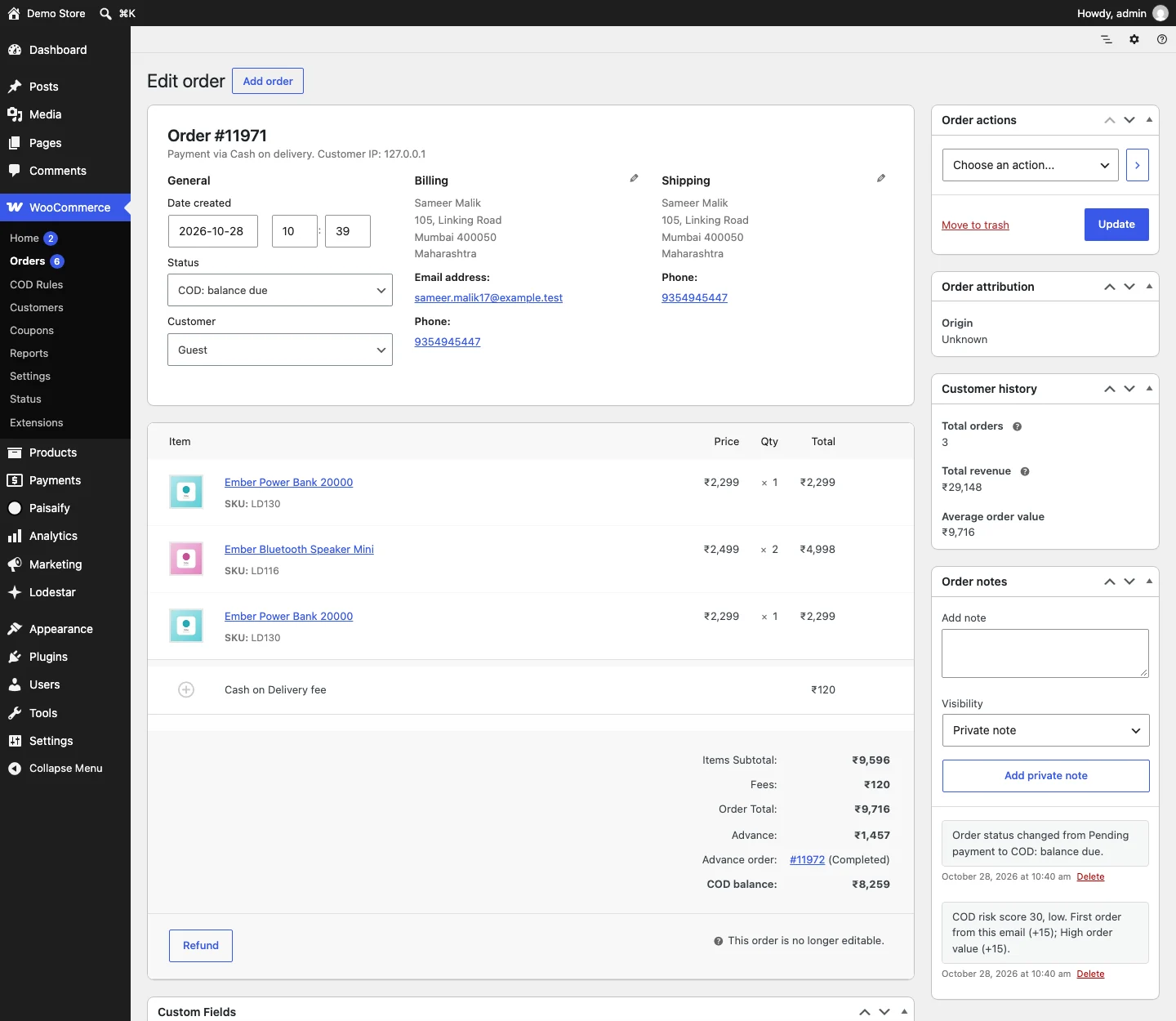 Status moves to COD: balance due
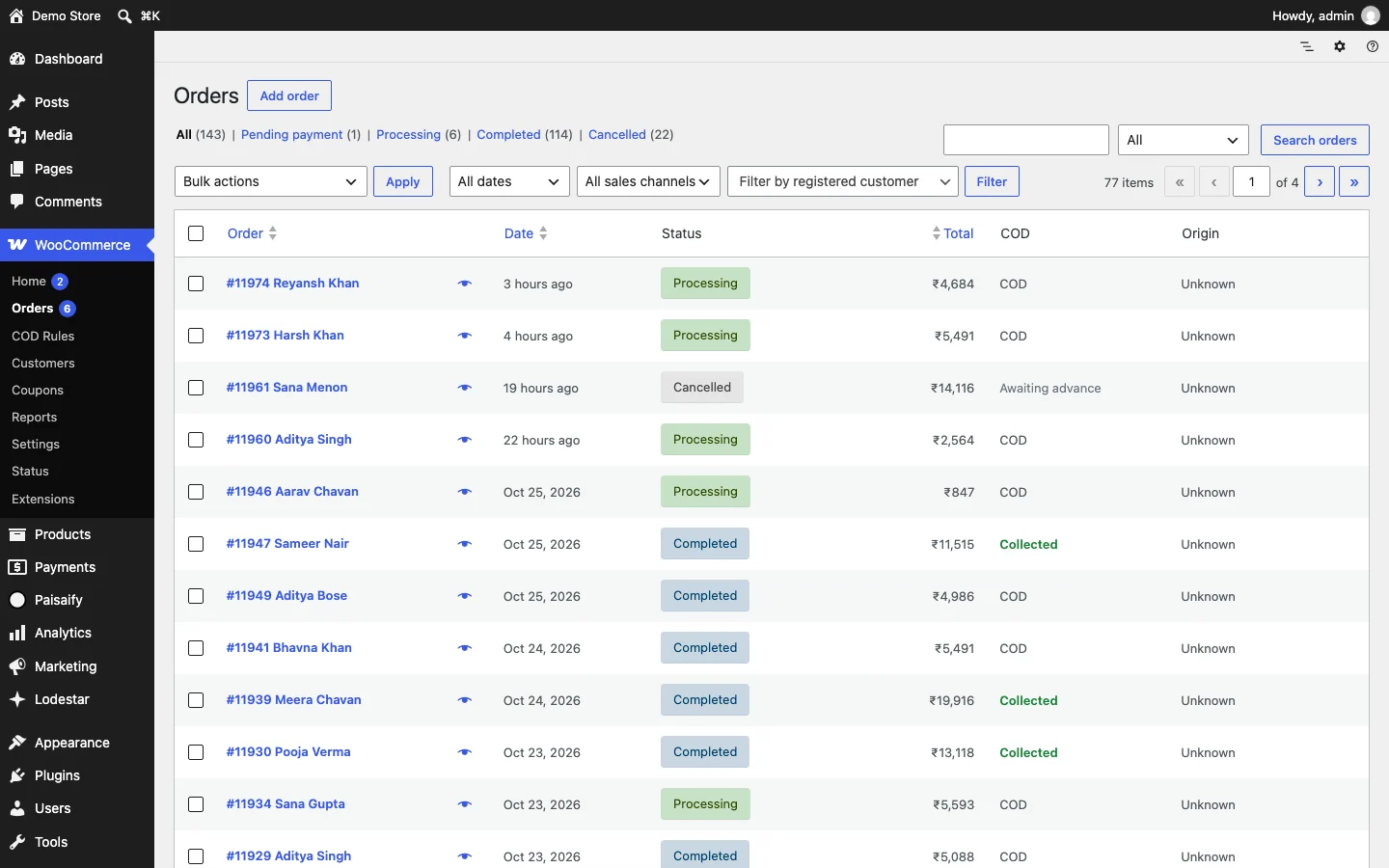 Balance collected, marked once
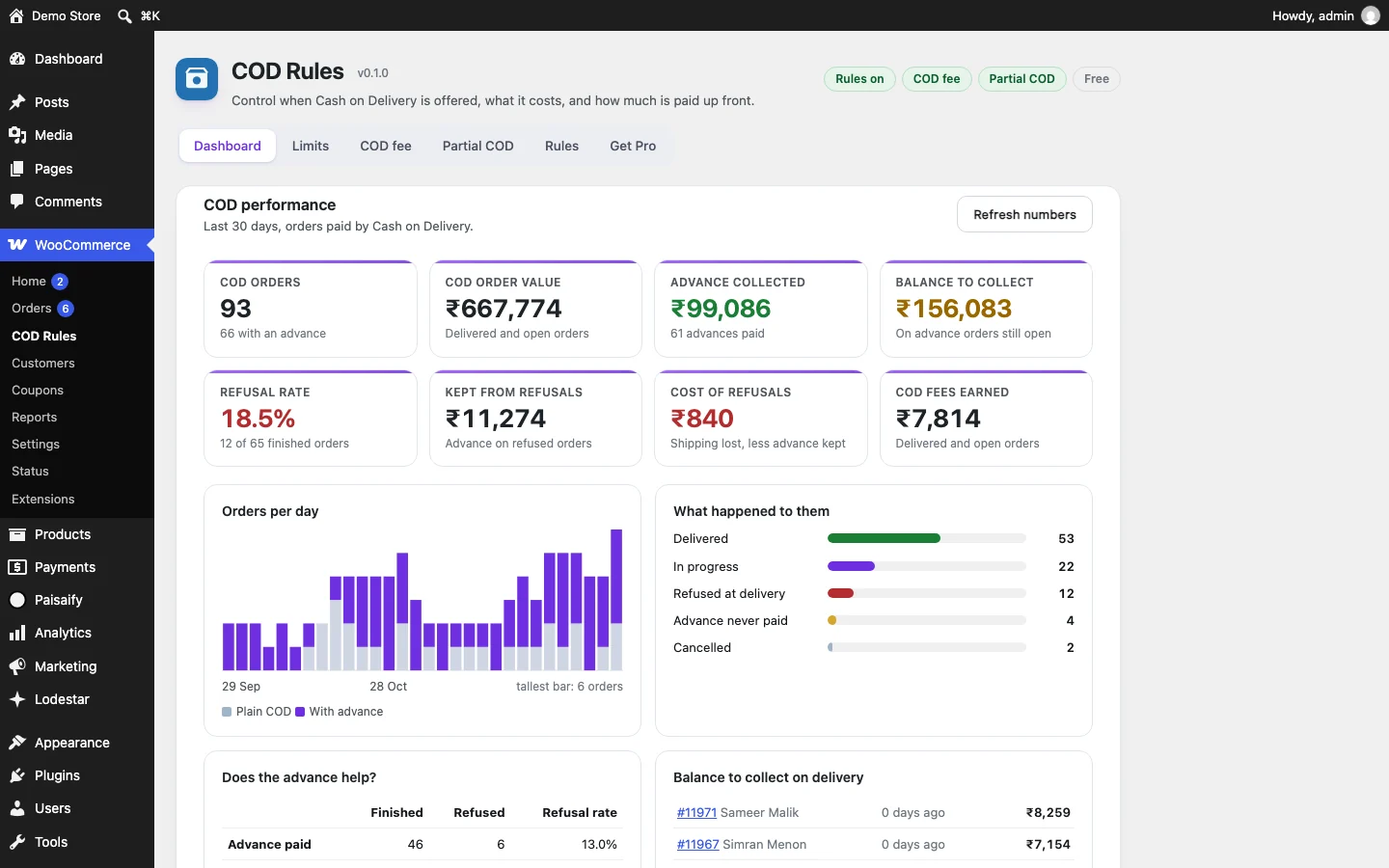 The numbers update
Checkout says what happens next: pay a small part now, the rest in cash when the parcel arrives.
Any gateway that works there works here. No gateway specific setup.
The order keeps its full total. The advance is a small linked order, so refunds and reports stay honest.
One order action. If the customer refuses at the door, you record that instead.
Orders, advance collected, balance still to collect, refusal rate.
Screens come from the real plugin on a fictional demo store. The names and numbers are made up.
What one refusal costs
A small order costs as much to ship as a big one. So per rupee sold, the refusals that hurt most are the small orders nobody thought to protect.
The calculator below shows how big the advance needs to be to cover your own shipping.
Try an order
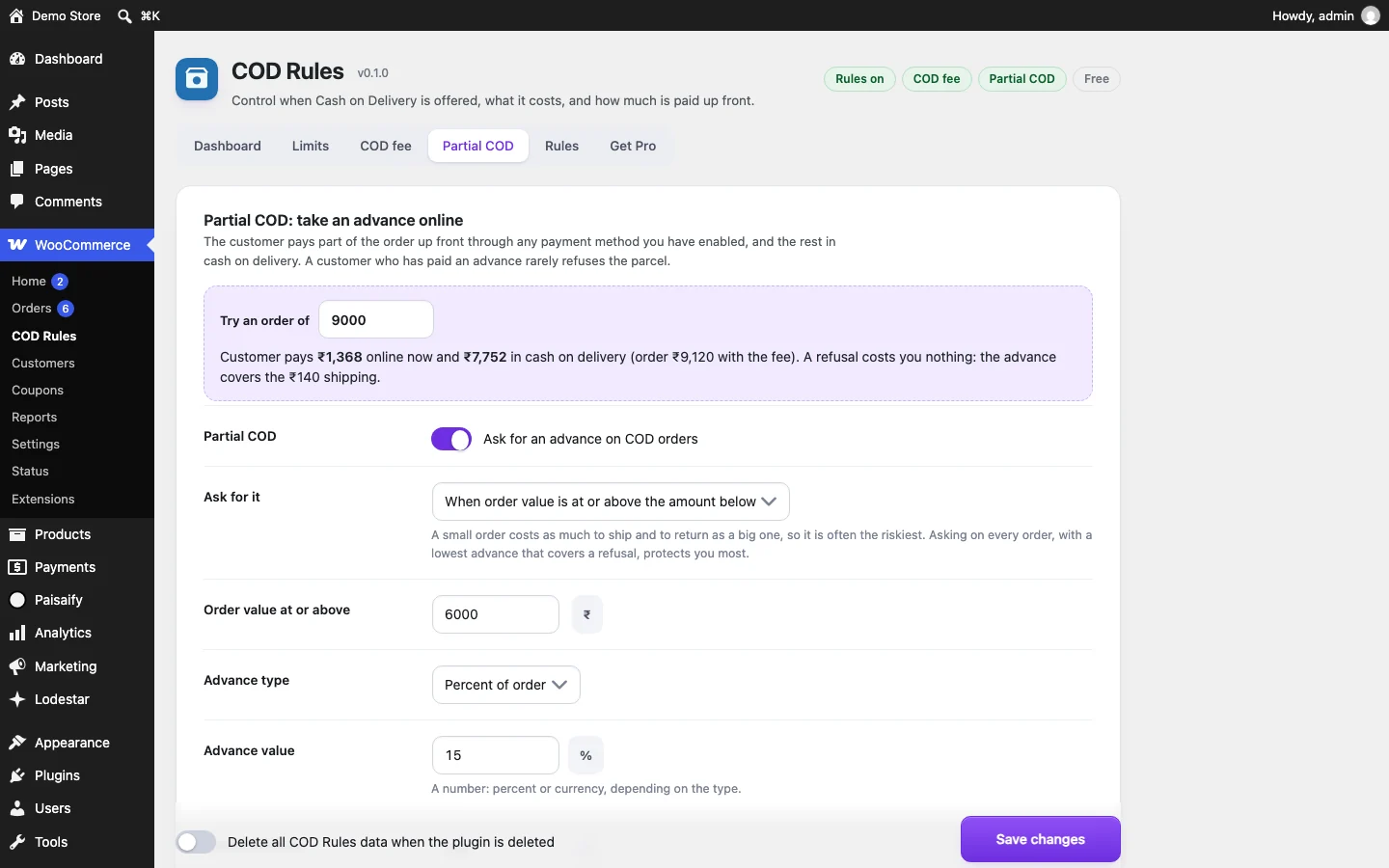
Move the sliders. This runs the same arithmetic as the plugin's settings screen: a fee of 40 plus 1 percent, capped at 120, then an advance as a share of the total with a floor.
Rupees, because the demo store is Indian. The plugin uses your store's currency.
₹500₹30,000
Shipping both ways, packing₹600
5%50%
Customer pays now
₹1,368
Cash on delivery
₹7,752
Order ₹9,120 including a COD fee of ₹120
Setup
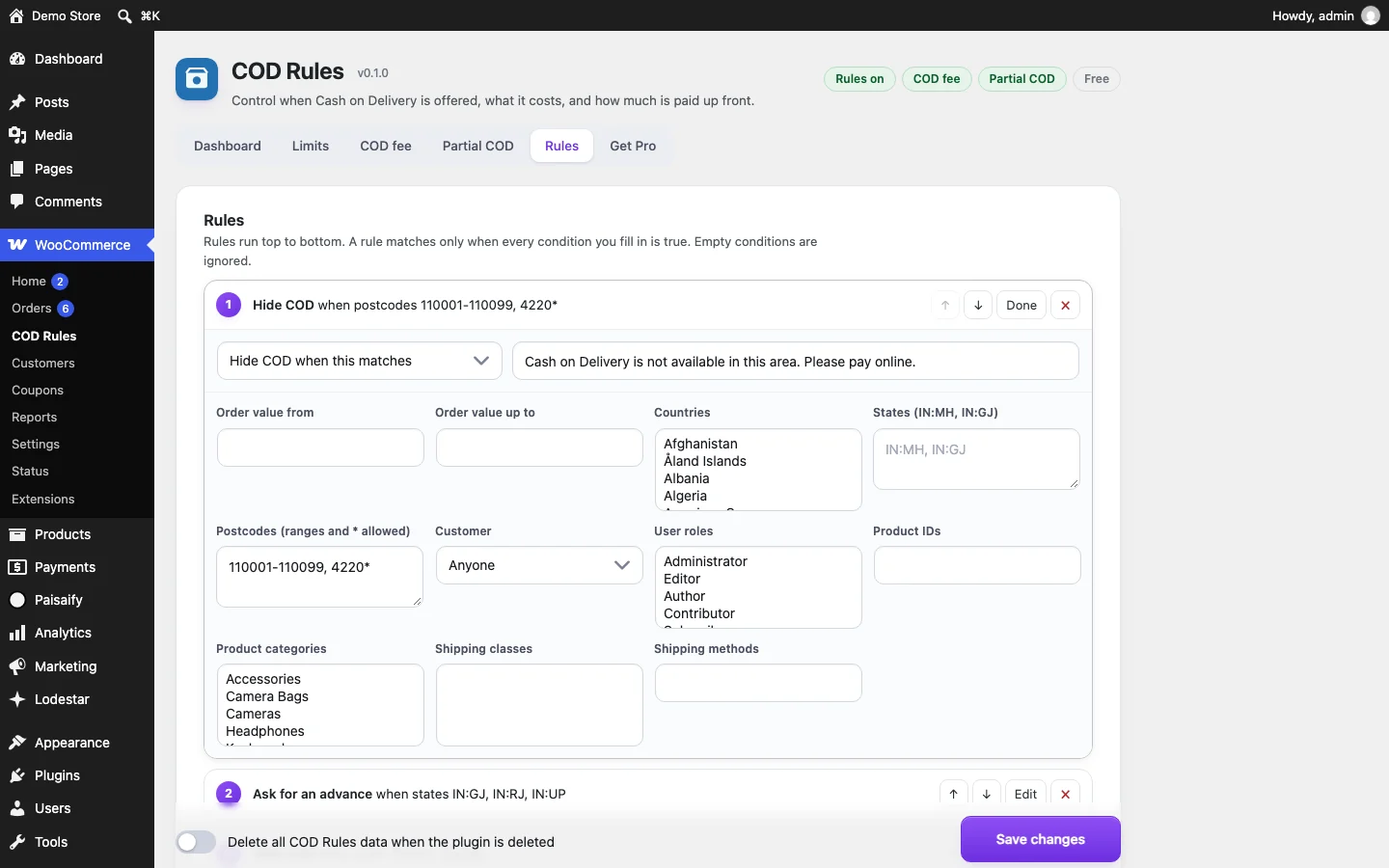
Hide COD for postcode ranges and wildcards, countries, states, user roles, products, categories, shipping classes or shipping methods. Rules run top to bottom and the first match wins. Each one can show its own message.
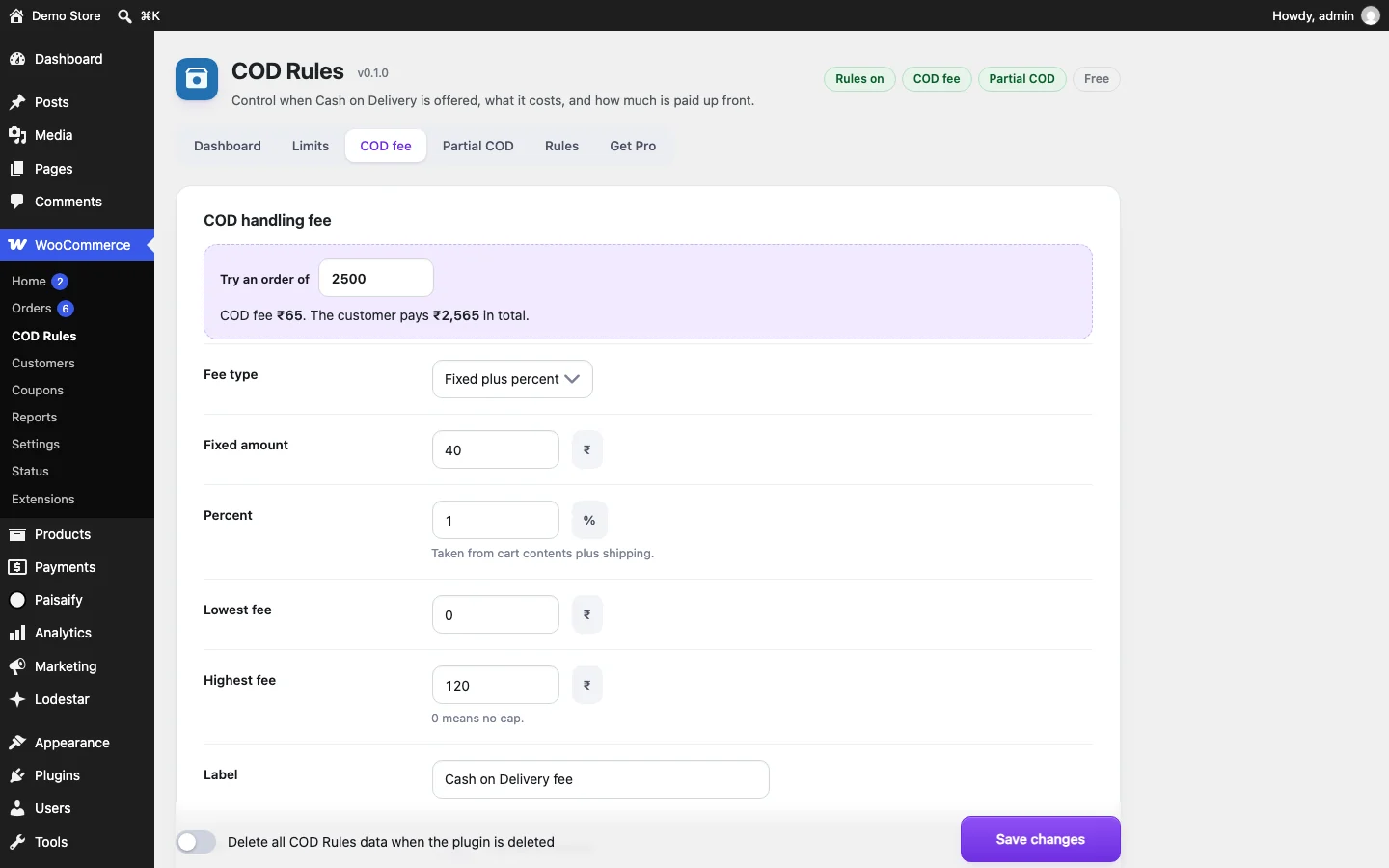
Fixed, percent, or both. Set a lowest and highest amount, make it taxable or not, and name it yourself. The settings screen shows what a real order would pay as you type.
Percent or flat, with a lowest and highest advance. Ask on every COD order, only above a value, or only when a rule says so. The customer pays it online, then the order shows only the balance.
The order screen shows the advance, the linked advance order and the COD balance. Two order actions: balance collected, or customer refused delivery. Refusals feed the dashboard.
01 / 04
Risk score Pro
Every COD order gets a score from 0 to 100. The order shows why: each sign that added points, in plain words. You pick the action for medium and high. Nothing is sent to an outside service, and it never runs on ordinary page views.
Tick and untick the signs. The points are the plugin's default weights, and you can change every one.
Weight on your store
database queries from the plugin on an ordinary page view. No script and no stylesheet either.
How this was measured. On 28 October 2026, version 0.1.0, on a local WooCommerce demo store with other plugins active. We loaded the home page and a search page with and without Threshold and read the query count WordPress reports. Every query was also checked for a call from plugin code: none. Checkout, order and admin screens do run queries, because that is where it works. The script is in the build folder as measure-queries.php.
Dashboard
Orders, advance collected, balance still to collect and refusal rate for the last 30 days, with a table that sets orders with an advance beside orders without one. Pro stretches it from 7 to 365 days and adds CSV and refusals by pincode.
COD orders
93
66 with an advance
Advance collected
₹99,086
61 advances paid
Balance to collect
₹156,083
On advance orders still open
Refusal rate
18.5%
12 of 65 finished orders
Refusal rate, orders with an advance against orders without one
All 93 COD orders
All figures come from a fictional demo store with made-up orders. They show what the report looks like, not what your store will see.
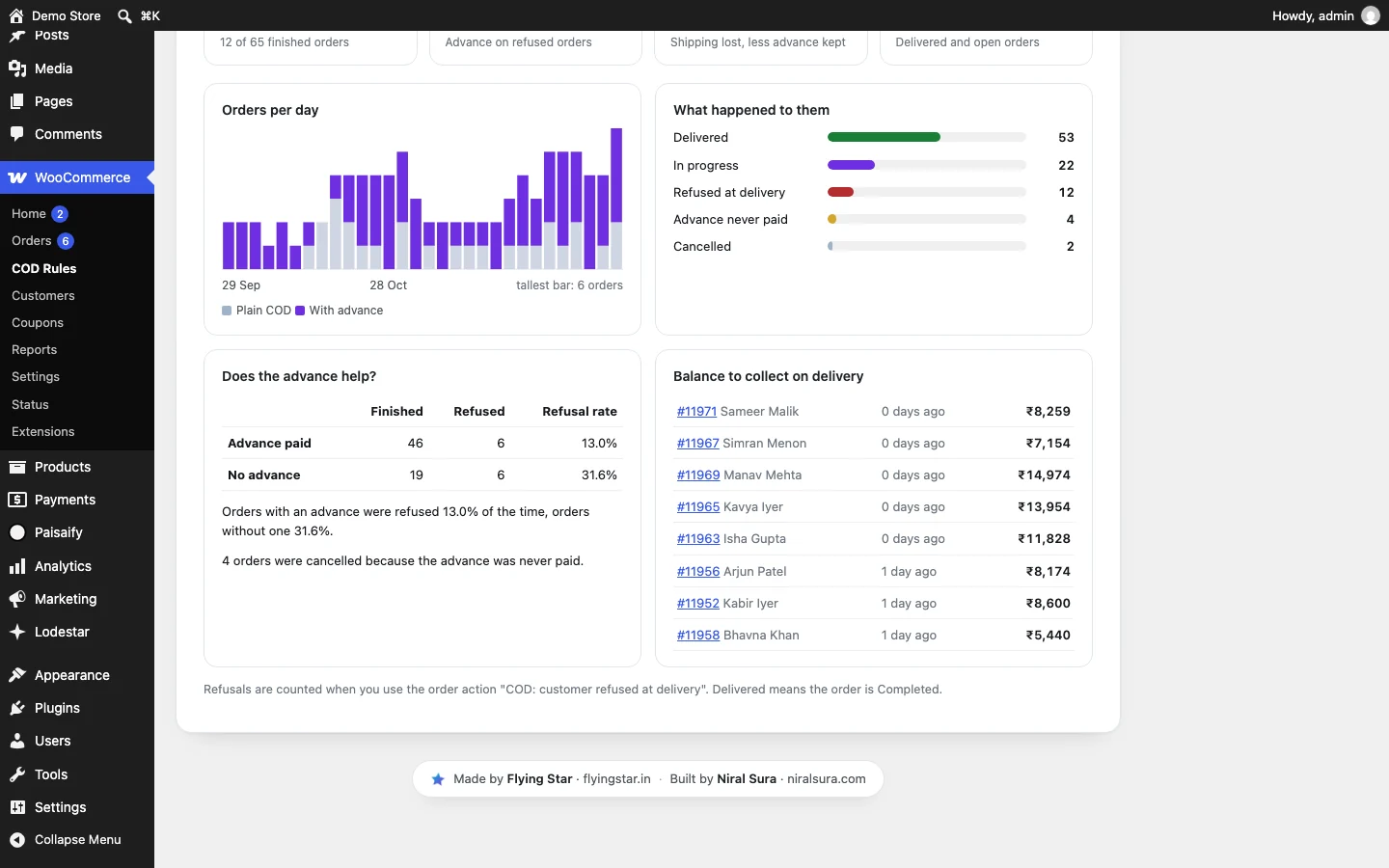
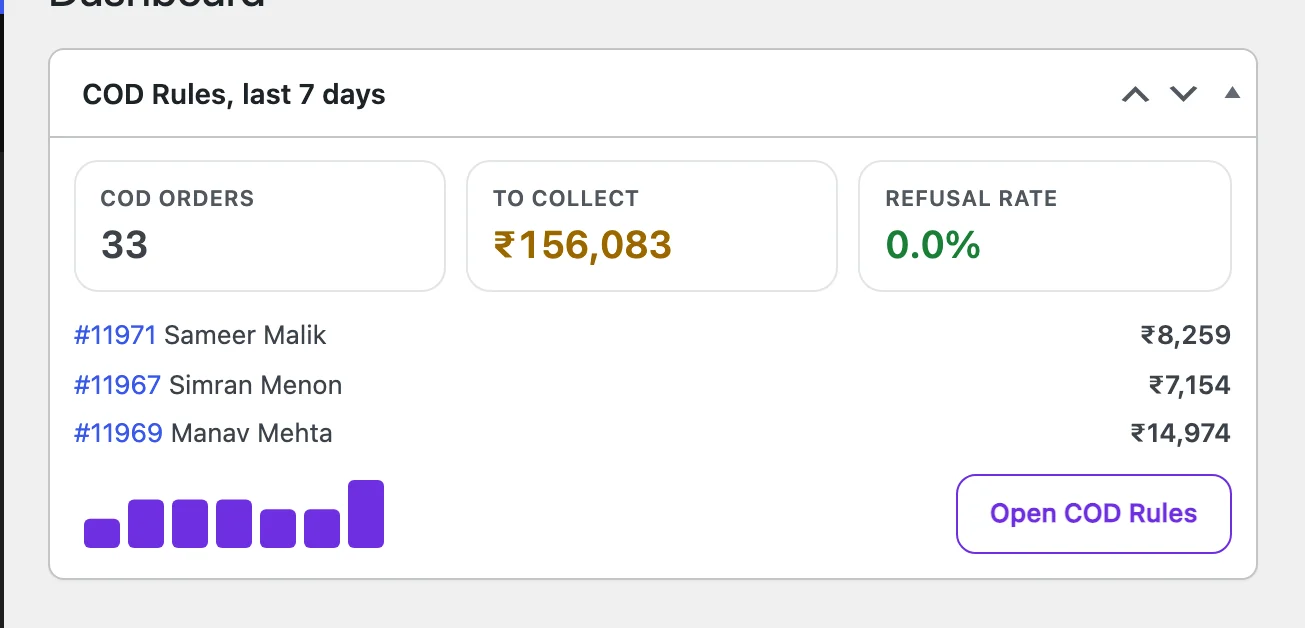
Left: the report. Right: the widget on the WordPress Dashboard, for the last 7 days.
Violet pills with a Pro tag need Threshold Pro. The rest is in the free plugin.
Free and Pro
| Feature | Free | Pro |
|---|---|---|
| Minimum and maximum order for COD | ||
| COD fee: fixed, percent or both, with caps | ||
| Partial COD: advance paid online with any gateway | ||
| Block and classic checkout, emails, order actions | ||
| Dashboard for the last 30 days | ||
| Rules by place, customer, product and shipping | Up to 3 rules | Unlimited |
| Rules by day of week and time of day | ||
| Fee and advance tiers by order value | ||
| Risk score on every COD order, with the reasons, and an action for risky ones | ||
| Customer risk: blocklist, repeat refusals, first-order advance | ||
| Email code (OTP) to confirm COD orders | ||
| Reminders, webhooks and a courier update API | ||
| Pincode checker for product pages | ||
| Dashboard for 7 to 365 days, CSV export, refusals by pincode |
Your settings carry over. Install Pro and the free plugin switches off by itself.
Free does the core job. The first 399 Pro licences are one payment for one site.
Rules, the fee, the advance and a 30 day dashboard. On WordPress.org.
$0always
Everything in Free, plus judgment: risk scores, schedules, tiers and the tools around the balance.
$29one time, then $49
The live buy link could not load. Reload the page, or email support@flyingstar.in.
Prices are in US dollars. A licence covers one site and includes updates. The first 199 licences are $29 one time, the next 200 are $49 one time, then Pro is $39 a year per site. Not included: SMS and WhatsApp codes, which are planned and not built. Payment is handled by Polar and the licence key arrives by email.
Guides
Partial COD means the customer pays a small part online and the rest in cash when the parcel arrives. Done well, the order total never changes.
Read the guide →reduce COD returnsHow to reduce COD refusals and returns in WooCommerceA refused parcel is the most expensive kind of order. Here is what actually moves the number, in the order that is easiest to try.
Read the guide →RTO in ecommerceWhat is RTO in ecommerce and how to bring it downRTO stands for return to origin. The courier tries to deliver, fails or is refused, and the parcel travels back to you.
Read the guide →fake COD ordersHow to stop fake COD orders in WooCommerceFake orders cost you shipping, packing and attention. A few layers, each cheap on its own, stop most of them.
Read the guide →cost of refused COD orderHow much does a refused COD order cost? A worked exampleUse your own numbers. The arithmetic is the same for every store.
Read the guide →COD risk scoreThe COD risk score: signs of an order that will be refusedNo single sign proves an order is bad. Several together make it worth a call, an advance or a code.
Read the guide →Short answers to what store owners check first. The long versions are in the docs.
Yes. The fee, the advance note and the redirect to the advance payment page work on the block checkout and on the classic checkout.
Any gateway that works on the WooCommerce pay-for-order page. Cash on Delivery itself is removed from that page, so the advance has to be paid online. Offline gateways such as bank transfer confirm the advance only when you mark the advance order as paid.
No. The main order keeps its full total. A small linked order for the advance amount is created and paid on the normal pay page. When it is paid, the main order moves to COD: balance due. Refunds of the advance go through the advance order, which your gateway already understands.
No. They are hidden from the orders list and WooCommerce Analytics does not count them as revenue. Each one is linked from its main order.
On ordinary page views it runs no code, queries nothing and loads no file. On the checkout it loads one 1.4 KB script. How we measured is on the home page.